Azure Cloud Security Implementation: RBAC, Key Vault & Backup
Overview
This lab focused on securing an Azure IaaS environment for a multi-department organization with regulatory compliance requirements (FISMA, PCI DSS). The environment had three departments, each with different access needs, and several security gaps that needed to be addressed: weak data isolation, unverified backups, and outdated vulnerability scanning.
The goal was to build a secure infrastructure from the ground up, implementing role-based access control, secrets management with encryption, and a reliable backup strategy with defined recovery objectives.
Phase 1: Identifying the Security Gaps
Before configuring anything, I assessed the existing environment and identified three core issues:
Data isolation failures. Users across departments had access to information they shouldn’t have. There was no clear separation between IT, marketing, and accounting resources.
Unverified backups. Administrators couldn’t confirm whether file and system backups were running correctly or meeting recovery timelines.
Stale vulnerability scanning. Scanning boundaries hadn’t been validated in over two years, leaving the environment exposed to undetected risks.
These gaps violated both FISMA and PCI DSS requirements, which was critical since the organization handles federal contracts and processes card transactions.
Phase 2: Role-Based Access Control
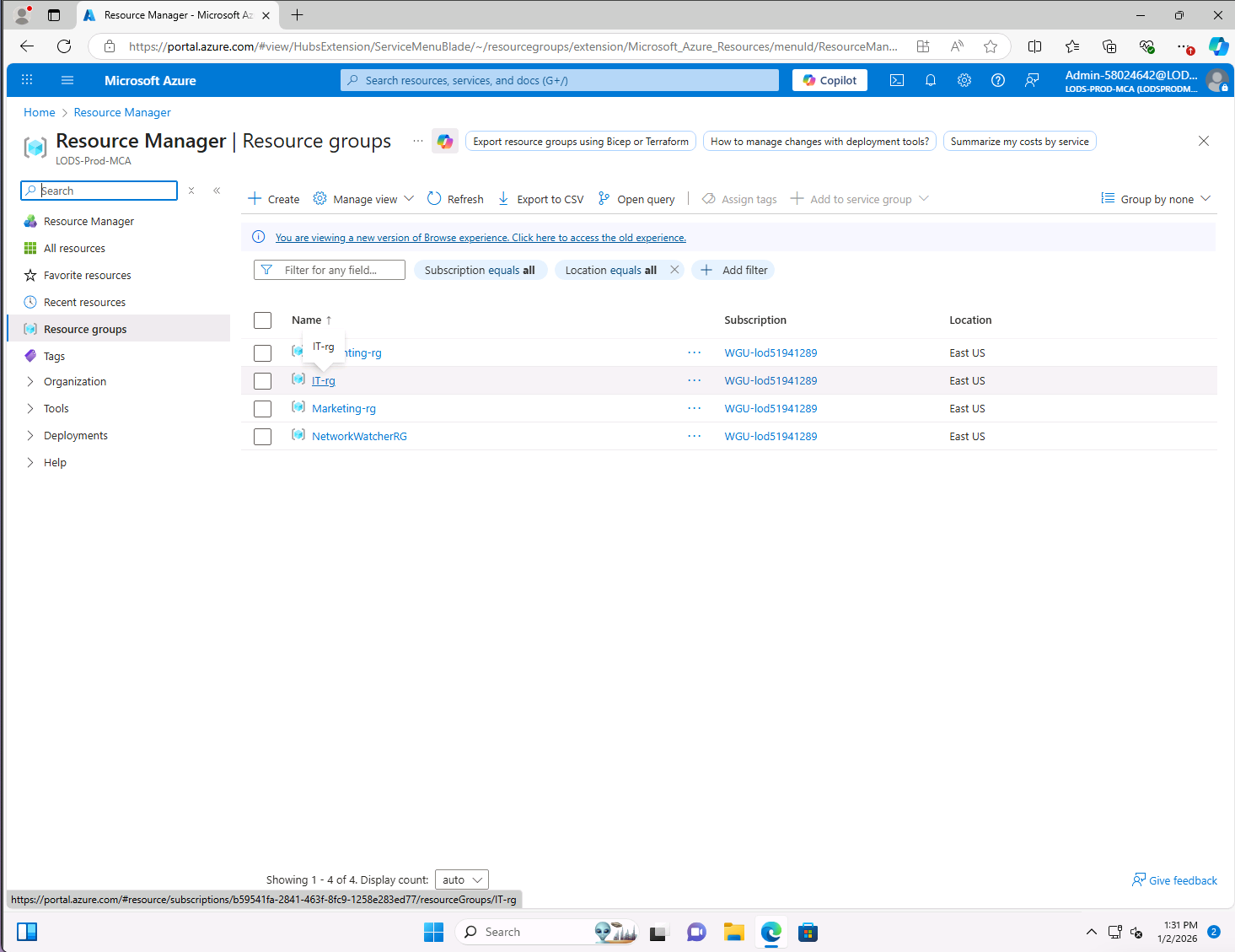
The first priority was fixing data isolation. I created dedicated resource groups for each department and assigned scoped RBAC roles following the principle of least privilege.
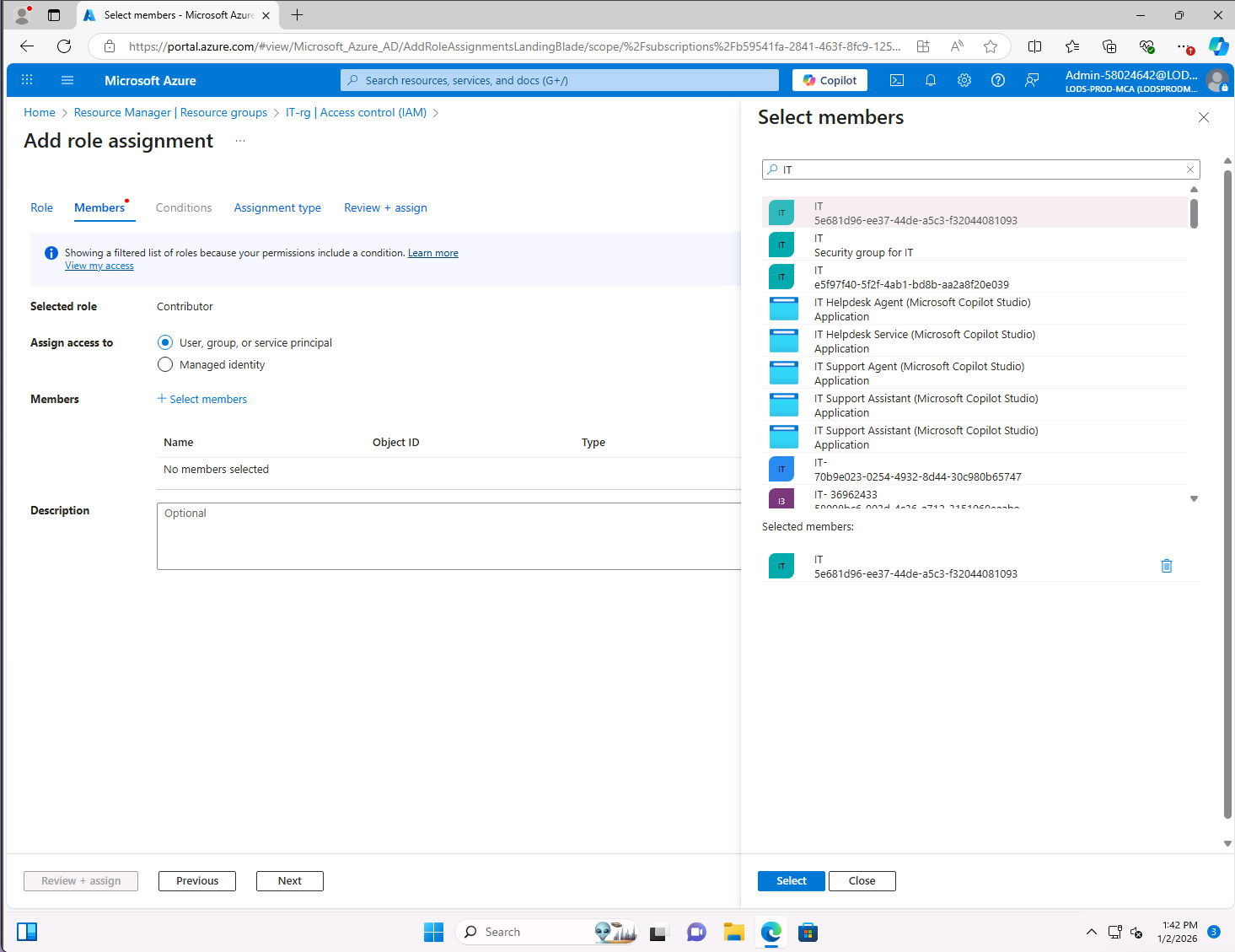
IT Resource Group: Contributor with custom policy restrictions. The IT team received the Contributor role within their resource group, with a custom policy preventing unauthorized changes to network security groups. This lets them manage systems while maintaining security standards.
Marketing Resource Group: Reader role with scoped permissions. Marketing received the Reader role, limited to viewing assets and monitoring campaigns within their own resource group. No ability to modify infrastructure or access sensitive data from other departments.
Accounting Resource Group: Storage Blob Data Contributor. Accounting needed regular access to financial reports and backups stored in Azure Storage. The Storage Blob Data Contributor role lets them upload and download files without access to policies or the ability to delete containers.
This configuration creates a rigid separation of roles. Each department can only access what they need for daily operations, and nothing else.
Phase 3: Azure Key Vault and Encryption
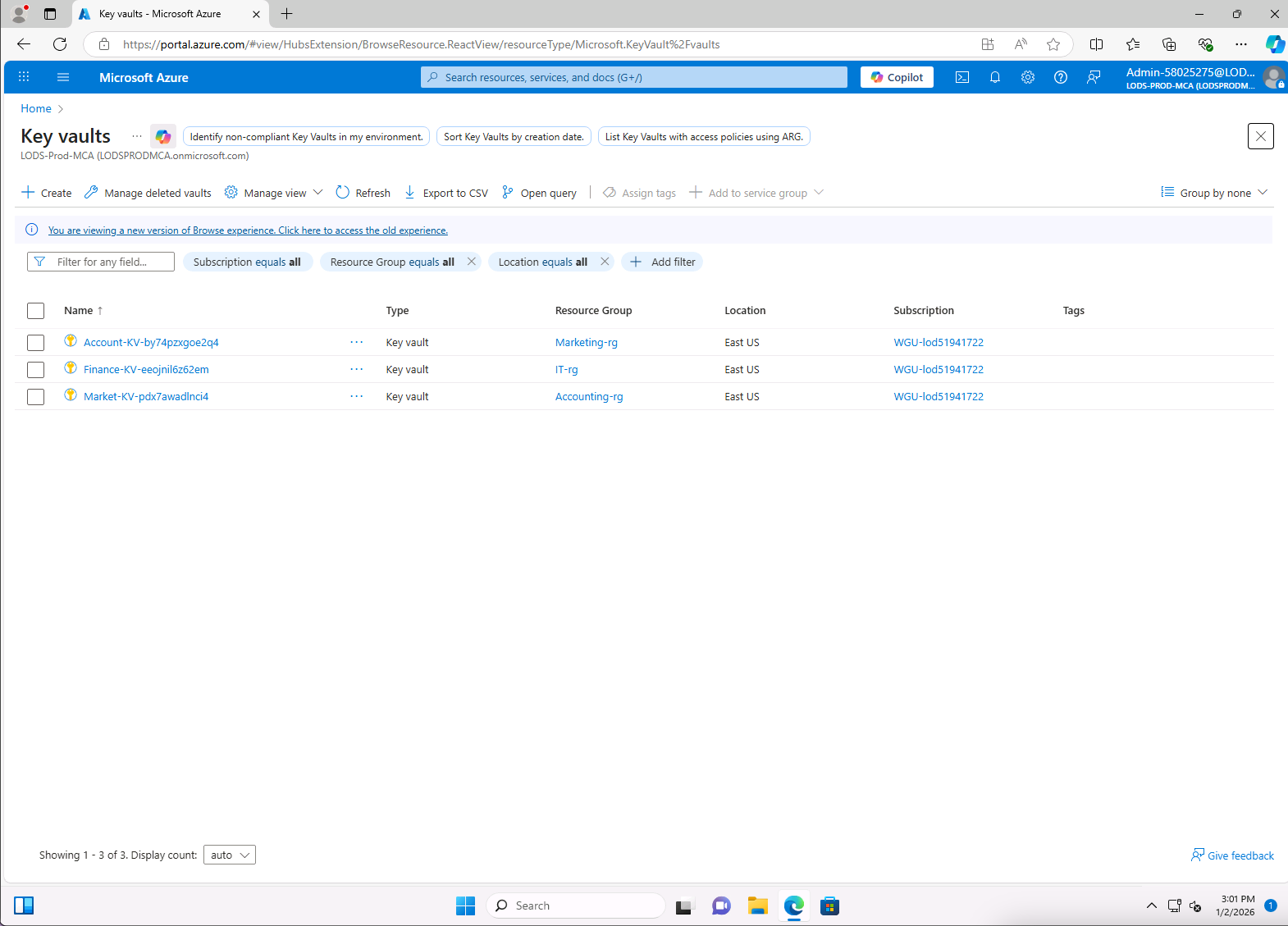
Next, I deployed Azure Key Vault instances for each department to secure sensitive data with encryption at rest and in transit.
Key Vault RBAC integration. Rather than using traditional access policies, I configured Azure RBAC as the permission model for every department’s Key Vault. This approach offers more flexible role assignments and better integration with the overall access control strategy. The IT resource group received the Key Vault Contributor role (manage contents, no permission changes). Marketing and accounting received Key Vault Secrets User and Key Vault Reader roles respectively, allowing them to view secrets without modifying sensitive information.
Encryption at rest: Customer-managed keys. Each department’s data was encrypted using a separate Key Vault instance holding its own customer-managed key. This gives the organization full control over encryption rather than relying on platform-managed keys. Sensitive data stays encrypted whether it’s in storage accounts, databases, or virtual machines.
Encryption in transit: HTTPS enforcement. I configured Key Vault to deny HTTP requests, enforcing HTTPS for all access to secrets and keys. Azure Key Vault already supports TLS for API calls, and denying plain HTTP adds defense in depth against man-in-the-middle attacks and unauthorized interception.
Phase 4: Backup and Recovery Configuration
The final phase addressed the backup gaps. I configured Azure Backup using Recovery Services Vault with two key settings aligned to the organization’s recovery goals.
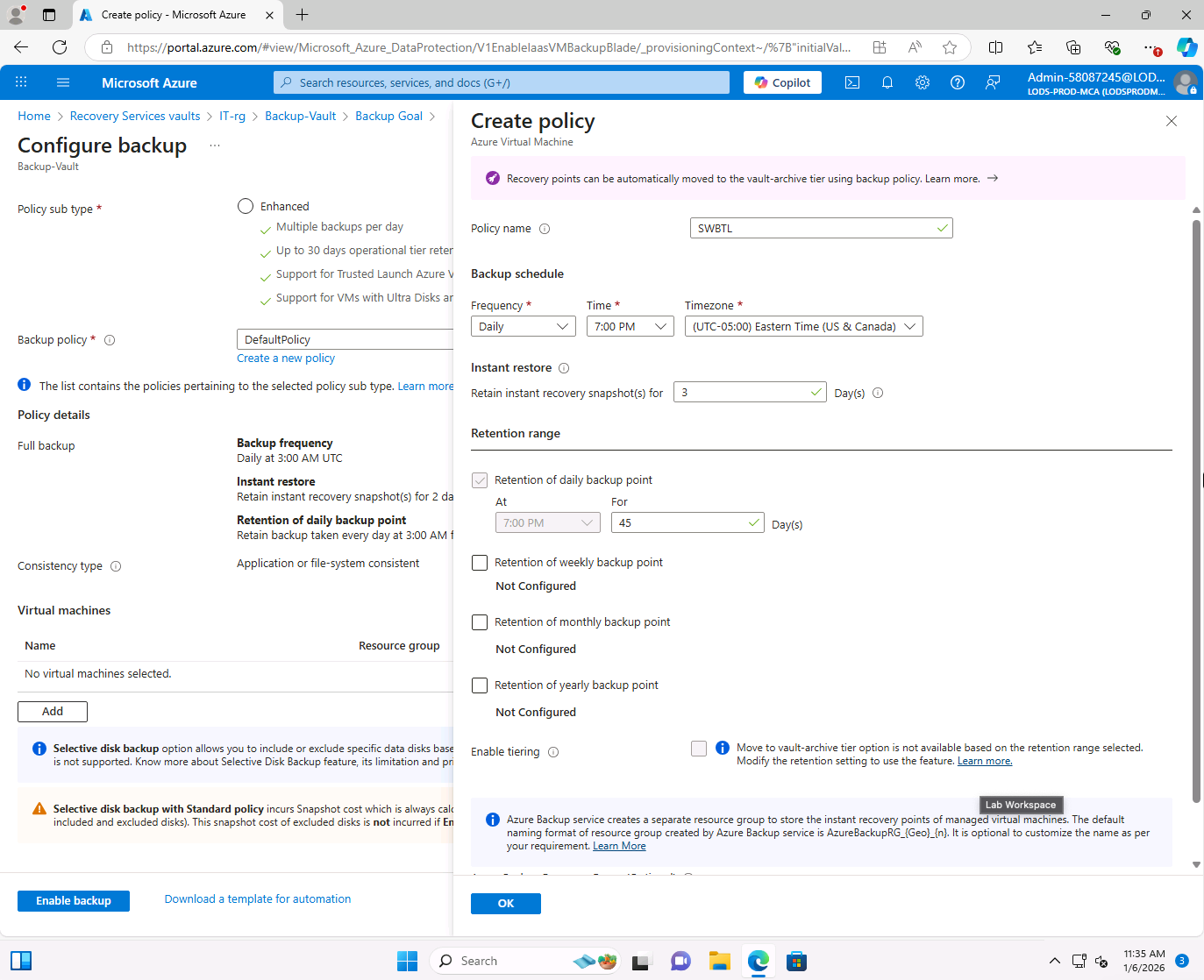
Daily backup schedule. A custom backup policy was created and configured to run daily at 7:00 p.m. Eastern Time, covering all virtual machines and file shares across departments. This schedule meets the one-day recovery point objective (RPO), ensuring no more than 24 hours of data is ever at risk.
Retention settings. Backup retention was set to 45 days for recovery points, with instant recovery snapshots retained for 3 days. The 45-day retention supports long-term continuity planning, while the 3-day instant snapshots enable rapid recovery for recent data loss. The recovery time objective (RTO) of 36 hours gives the organization a realistic window to restore operations after a disruption.
The backup deployment completed successfully across all virtual machines in the environment.
IaaS Shared Responsibility Considerations
Using Azure’s IaaS model means the organization and Microsoft share responsibility for security. Microsoft handles the physical infrastructure: data centers, networking, and hardware. The organization is responsible for everything running on top of that: operating systems, patches, access controls, backup configurations, and workload monitoring.
This shared model introduces specific risks worth noting:
Misconfiguration risk. With the organization managing RBAC, firewalls, and resource permissions, any mistake can expose sensitive data. Impact is high since misconfigurations can grant excessive access to unauthorized users.
Patching gaps. The organization owns OS and application updates. Unpatched systems create exploitable vulnerabilities that can lead to system compromise and data loss.
Backup failures. If backup policies aren’t correctly maintained, recovery during a disaster may fail or exceed the defined RTO, potentially resulting in extended downtime or data loss.
Recommendations
Based on this implementation, three additional measures would strengthen the environment:
Enable Microsoft Defender for Cloud across all resource groups. Defender for Cloud provides continuous security monitoring, misconfiguration detection, and threat protection with recommendations aligned to industry standards.
Enforce governance with Azure Policy to ensure all deployed resources comply with organizational standards. Policy-driven governance reduces misconfiguration frequency and enforces compliance at deployment time, aligned with CIS benchmark recommendations.
Conduct quarterly access reviews using Azure Access Reviews. Regular reviews of role assignments across departments catch privilege creep and remove unnecessary permissions, reducing insider threat risk in line with zero-trust architecture and NIST/ISO 27001 guidance.
Tools Used
- Azure Portal
- Azure RBAC (Role-Based Access Control)
- Azure Key Vault (customer-managed keys, HTTPS enforcement)
- Azure Backup (Recovery Services Vault)
- Azure Resource Groups
- Azure IaaS (Virtual Machines, Storage, Networking)
Lessons Learned
This lab reinforced several principles that apply to any cloud security implementation:
- Least privilege is the foundation. Every access decision should start with “what’s the minimum this role needs?” and build from there. Over-permissioning is easy to do and hard to detect after the fact.
- Encryption at rest and in transit are separate problems. Having one without the other leaves gaps. Customer-managed keys and HTTPS enforcement address both sides.
- Backup policies need defined, measurable objectives. RPO and RTO aren’t just compliance checkboxes. They define how much data you can afford to lose and how long you can afford to be down. Every backup configuration should map directly to those numbers.
- Shared responsibility means shared risk. Using IaaS doesn’t mean Microsoft handles security. The organization owns configuration, patching, and monitoring. Misunderstanding that boundary is where most cloud security failures happen.